
[로데시] 개발
[대학전쟁] 양면빙고 웹 개발 04 - 타일 뒤집기 (flip), 이동 (move) 본문
반응형
0️⃣ 지난 번까지..
대학전쟁에 나온 '양면빙고 (double sided bingo)' 게임을 보고 ☰ 양면빙고 (double-sided-bingo) 개발 과정
1️⃣ 뒤집기 (flip)
📌 App.js 코드setBoardTiles(prev =>
prev.map(cell =>
cell && cell.key === key
? { ...cell, isFlipped: !cell.isFlipped }
: cell
)
);Board판에서도 뒤집을 수 있게 handleFlip 함수에 setBoardTiles 상태 업데이트 로직을 추가한다.
const BingoCell = ({ id, tile, onFlip }) =>BingoCell 컴포넌트의 props에 onFilp을 추가한다.
return (
  <div ref={setNodeRef} className="BingoCell">
    {tile && (
      <div onClick={() => onFlip(tile.key)}>
        <TileItem
          tileId={tile.id} isFlipped={tile.isFlipped} />
      </div>)}
  </div>
  );
BingoCell에서 onFlip를 하위 컴포넌트로 전달하도록 수정했다.
const BingoBoard = ({ boardTiles, movableCell, onFlip })return
<BingoCell
key={cellId}
id={cellId}
tile={boardTiles[cellId]}
onFlip={onFlip}
/>BingoBoard에서 onFlip를 하위 컴포넌트로 전달하도록 수정한다.
<BingoBoard boardTiles={boardTiles} onFlip={handleFlip} />App에서 onFlip를 하위 컴포넌트로 전달하도록 수정한다.

2️⃣ 이동 (move)
뒤집기와 이동 구분은 @dnd-kit에서 자동으로 해준다.const isAdjaccent = (from, to) => {
// 좌표 변환 공식
const r1 = Math.floor(from / 4);
const c1 = from % 4;
const r2 = Math.floor(to / 4);
const c2= to % 4;
// 이동이 가능한가
return Math.abs(r1 - r2) + Math.abs(c1 - c2) === 1;
};먼저 이동 가능한 칸인지 (상,하,좌,우 한 칸) 여부를 판단하는 로직이 필요하다.
const BingoTile = ({ tile, cellId, onFlip }) => {
  const { attributes, listeners, setNodeRef, transform } = useDraggable({
    id: `bingo-${tile.key}`,
    data: {
      type: "BINGO_TILE",
      tileKey: tile.key,
      fromCell: cellId,
    },
  });

  const style = {
    transform: CSS.Transform.toString(transform),
  };

  return (
    <div
      ref={setNodeRef}
      style={style}
      {...attributes}
      {...listeners}
      onClick={() => onFlip(tile.key)}
    >
      <TileItem
        tileId={tile.id}
        isFlipped={tile.isFlipped}
      />
    </div>
  );
};

export default BingoTile;
이동 대상을 관리하는 새로운 컴포넌트 BingoTile을 작성한다.
<div ref={setNodeRef} className="BingoCell">
  {tile && (
    <BingoTile
      tile={tile}
      cellId={id}
      onFlip={onFlip} /> )}
</div>
BingoCell 컴포넌트가 렌더링하는 컴포넌트를 BingoTile로 변경한다.
if ( activeType === "BINGO_TILE" && overType === "BINGO_CELL" ) {
  const from = active.data.current.fromCell;
  const to = over.id;

  // 같은 칸
  if ( from === to ) return;
  // 인접 칸 X
  if (!isAdjacent( from, to )) return;
  // 이미 타일 O
  if (boardTiles[to]) return;

  setBoardTiles(prev => {
    const next = [...prev];
    next[to] = next[from];
    next[from] = null;
    return next;
  });
}
App의 handleDragEnd에 이동 가능 여부를 판단하는 로직을 추가하여 코드를 작성한다.

3️⃣ 이동 (move) - 시각화
사용자가 어떤 칸으로 이동할 수 있는지 없는지를 시각적으로 보여주면 좋을 것 같다.const [movableCell, setMovableCell] = useState([]);const type = active.data.current?.type;
// 착수: 모든 빈 칸
if (type === "TILE") {
const cells = boardTiles
.map((tile, idx) => (tile === null ? idx : null))
.filter(v => v !== null);
setMovableCell(cells);
}
// 이동: 인접한 빈 칸
if (type === "BINGO_TILE") {
const from = active.data.current.fromCell;
const cells = boardTiles
.map((tile, idx) =>
tile === null && isAdjacent(from, idx) ? idx : null
)
.filter(v => v !== null);
setMovableCell(cells);
}시작 위치에 따라 이동 가능한 칸을 다르게 계산하고 그 결과를 movableCell 상태로 관리하는 로직을 handleDragStart 함수에 추가한다.
setMovableCell([]);handleDragEnd에서는 이동이 끝났으므로 이동 가능한 칸 상태를 초기화한다.
<BingoBoard boardTiles={boardTiles} movableCell={movableCell} onFlip={handleFlip} />App에서 movableCell를 하위 컴포넌트로 전달하도록 수정한다.
const BingoBoard = ({ boardTiles, movableCell, onFlip })

<BingoCell
  key={cellId}
  id={cellId}
  tile={boardTiles[cellId]}
  movableCell={movableCell}
  onFlip={onFlip}
/>
BingoBoard 컴포넌트에 movableCell props를 추가하고 하위 컴포넌트로 전달하도록 수정한다.
// 빙고 칸을 담당
const BingoCell = ({ id, tile, movableCell, onFlip }) => {
  const { setNodeRef, isOver } = useDroppable({
    id,
    data: { type: "BINGO_CELL" },
  });

  const canDrop = movableCell.includes(id);

  const cellClass = `
    BingoCell
    ${isOver && canDrop ? "move" : ""}
    ${isOver && !canDrop ? "unmove" : ""}
  `;

  return (
    <div ref={setNodeRef} className={cellClass}>
      {tile && (
        <BingoTile
          tile={tile}
          cellId={id}
          onFlip={onFlip} /> )}
    </div>
  );
};

export default BingoCell;
착수/이동 가능 여부에 따라 다른 CSS를 적용하기 위해 cellClass를 설정한다.
.BingoCell.move {
  background-color: #cce5ff;
  border-color: #3399ff;
}

.BingoCell.unmove {
  background-color: #ffcfcc;
  border-color: #ff5233;
}
착수/이동 가능 여부에 따라 다른 CSS를 적용한다.

5️⃣ 앞으로...
양면빙고의 기능인 착수(place)에 이어 뒤집기(flip)와 이동(move)까지 모든 기능을 끝냈다.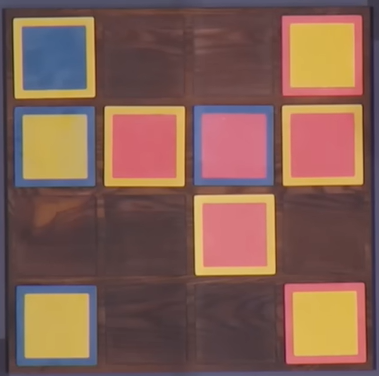
반응형
'개인 개발 > 대학전쟁' 카테고리의 다른 글
| [대학전쟁3] 양면빙고 웹 개발 06 - 직전 타일 이동, 뒤집기 제한 (0) | 2026.01.23 |
|---|---|
| [대학전쟁] 양면빙고 웹 개발 05 - 빙고 판단, player 2명 (0) | 2026.01.20 |
| [대학전쟁3] 양면빙고 웹 개발 03 - 타일 착수 (place) (0) | 2026.01.16 |
| [대학전쟁3] 양면빙고 웹 개발 02 - 타일 list 내 이동 (0) | 2026.01.14 |
| [대학전쟁3] 양면빙고 웹 개발 01 - 타일 list, 타일 뒤집기 (0) | 2026.01.12 |
'개인 개발/대학전쟁' Related Articles
more


